Virtual Try-On Kiosk for Clothing Stores: Setup, Cost, and Privacy Guide

Quick answer
Fitting rooms create their own kind of friction. There is a queue, one item goes in at a time, and a customer who is not sure about a piece often just leaves it on the rack rather than wait to try it. An in-store kiosk does not remove the fitting room. It narrows what actually needs one.
What is a virtual try-on kiosk?
It is the physical-store version of the try-on button you might see on a product page. Instead of a shopper uploading a photo from home, they stand in front of a tablet in the store, and the same AI engine that powers an online try-on button generates the preview on the spot.
Some vendors call this a smart mirror or a virtual fitting room, and the interface can differ, a tablet screen versus a floor-standing mirror display. The job underneath is the same either way: show the customer wearing the item before they commit to trying it on physically.
How does an in-store try-on kiosk work?
The flow is short by design. A customer with no account and no app to download should be able to use one in under a minute:
- The customer takes a photo. They stand in front of the kiosk's tablet camera, or a staff member helps on a first visit.
- They browse the store's real catalog. Whatever is loaded into the kiosk is what the store actually sells, kept in sync with the same catalog behind the online store.
- They pick a garment. No size chart guessing at this stage, just a tap.
- An AI model generates the preview. It reads the customer's body, pose, and proportions from their photo, then renders the chosen garment on them.
- The result appears in seconds. The customer keeps their own face and background, sees the garment applied realistically, and can try another item immediately.
What hardware does a virtual try-on kiosk need?
Nothing exotic. A modern try-on kiosk is software running on standard hardware, not a purpose-built machine:
- A tablet with a front or rear camera. Corlen's kiosk runs in any tablet browser, with no dedicated app to install.
- A stable internet connection, since the AI generation happens in the cloud rather than on the device itself.
- A stand or mount at a height customers can use comfortably, with enough space in front of it for a full-body shot.
- No body scanner, no depth sensor, no special lighting rig, and no measuring.
Why add virtual try-on to a physical store?
The core reason is the same one that drives virtual try-on online: a customer commits faster when they can see how something looks on them, not on a mannequin or a model with a different build. In a physical store, the kiosk also solves a problem the online store does not have, a fitting room that can only hold one customer and one item at a time.
Self-service also changes behavior in a specific way: people browse and add more when nobody is watching what they pick. McDonald's self-order kiosk rollout is the widely cited example, credited with increasing average order size largely because customers could order freely without a line building behind them or a cashier watching each choice. A clothing kiosk runs on the same logic. A customer can preview fifteen items with nobody judging how many times they change their mind, then walk into the fitting room already knowing which two or three are worth the trip.
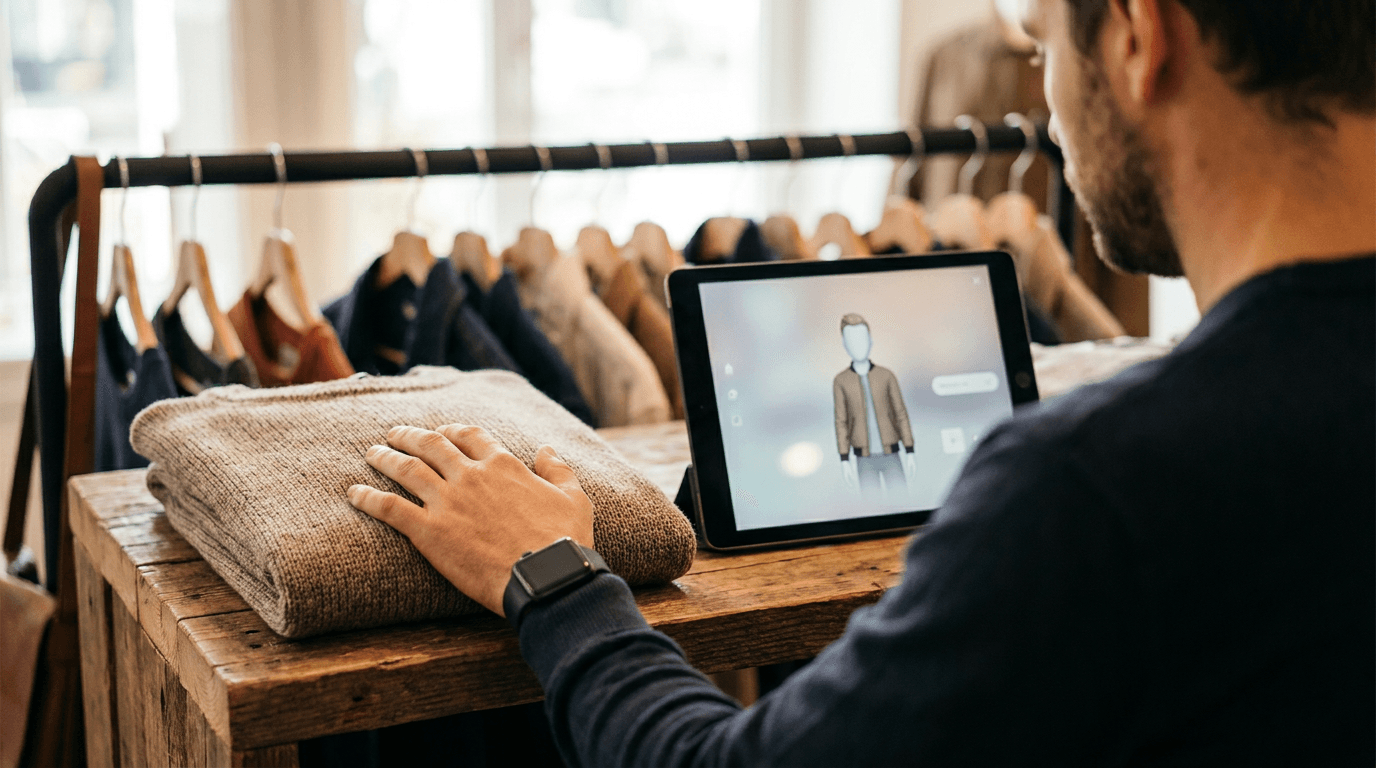
For shops where trying on many outfits back to back in a shared fitting room is not comfortable for every customer, a kiosk gives another option: preview the look fully dressed on a screen, then decide whether to physically try it on at all.
Is it safe to capture customer photos in a store?
It can be, if the system is built for it from the start. Check this directly rather than assuming it, since a kiosk photo is a more sensitive thing to collect than a name and an email.
Corlen's approach: a kiosk photo is stored temporarily in a private, encrypted bucket, used only to generate the try-on preview, and deleted automatically after 2 hours. A customer can also tap Delete My Photos at any point during their visit for immediate deletion. Corlen never runs face recognition or any biometric analysis on the photo, and never shares it with anyone, including the store owner. The full policy is in the Privacy Notice.
What should you look for in a virtual try-on kiosk?
If you are evaluating one for your own store, a few things matter more than how polished the demo looks:
- A privacy policy that names specifics: how long a photo is kept and whether face recognition runs on it, not a vague promise.
- Catalog sync with your online store: a kiosk showing outdated stock is worse than no kiosk at all.
- No login or app required for the customer: every extra step before someone can try something on is a customer who walks away instead.
- The same engine across channels: if you also sell online, check whether the kiosk and your storefront try-on run on the same system, so quality and pricing do not drift apart.
- Hardware you already own works: a kiosk that only runs on one specific tablet model is a harder sell than one that runs in any browser.
Corlen runs the same try-on engine and the same product catalog across a Shopify storefront, an in-store kiosk, and a developer API, so a store is not maintaining separate systems for online and in-store try-on. For the broader case on why virtual try-on matters at all, see how to choose a virtual try-on app for your store.
Want to see the same engine that runs Corlen's kiosk on your own photo first? Try Corlen, no account needed. If you run a physical store and want to talk about adding an in-store kiosk, get in touch.
Frequently asked questions
What is a virtual try-on kiosk?
A tablet placed inside a physical clothing store that lets a customer see themselves wearing an item from the catalog without physically putting it on. The customer takes a photo at the kiosk, picks a garment, and an AI model generates a realistic preview in seconds.
What hardware does a virtual try-on kiosk need?
A tablet with a camera, a stand or mount, and a stable internet connection. Corlen's kiosk runs in any tablet browser, so there is no dedicated app to install and no custom-built hardware to buy.
Is it safe to capture customer photos in a store?
It can be, if the system is built for it. Corlen never runs face recognition on a kiosk photo, never shares it with anyone, deletes it automatically after 2 hours, and gives the customer a manual delete option at any time.
Does a try-on kiosk replace the fitting room?
No, it narrows what a customer takes into the fitting room. A shopper can preview many more items on the kiosk than they could realistically try on physically, then take only their top picks in to put on for real.
Can the same catalog power an online store and an in-store kiosk?
Yes. Corlen runs the same try-on engine and the same product catalog across a Shopify storefront, an in-store kiosk, and a developer API, so a store is not maintaining separate systems for online and in-store try-on.
How do I add a virtual try-on kiosk to my store?
Get in touch through the contact section on the Corlen homepage. A kiosk uses the same underlying account and catalog as the Shopify app or API, so setup mainly means loading a tablet with the kiosk's store link.
Ready to add real try-on to your store?
Install Corlen on Shopify in minutes, or build it into your own platform with the developer API.
Similar posts
Virtual Fitting Room Software: What It Is and How to Choose One
Virtual fitting room software covers AR overlays, 3D body scanning, and AI photo try-on. Here is what each actually does and how to pick the right one.
Read articleGuidesVirtual Try-On for Big and Tall Clothing: Solving Two Fit Problems at Once
Big and tall sizing has to solve girth and length at the same time, and a size chart alone rarely does both. Here is what a fit preview needs to get right.
Read articleGuidesVirtual Try-On for Halloween Costumes: Why Costume Sizing Is Its Own Problem
Costume sizing rarely matches everyday clothing charts, and a bad fit often arrives too close to the date to fix. Here is how a fit preview helps.
Read articleSee it on your own photo
Corlen shows your customers how any garment looks on their own body, in seconds. Try it free, no account needed.
Try Corlen free